
USB Port Colors Explained: White, Black, Red, Yellow and Teal
USB Port Colors Explained: What White, Black, Red, Yellow, and Teal Mean
USB port colors can be confusing. You plug in a cable, see a colored port on your laptop or desktop, and wonder whether it means faster charging, quicker data transfer, or some special feature. The truth is that USB colors are helpful clues, but they are not a universal standard. Different manufacturers sometimes use colors differently.
Still, there are common patterns. If you know what to look for, usb port colors explained becomes much easier to understand.
Why USB Port Colors Matter
USB ports do more than connect devices. Depending on the port type, they may offer:
- Faster data transfer
- Better power delivery
- Charging even when the computer is off
- Support for newer USB standards
Color coding is meant to make these differences easier to spot at a glance. But because manufacturers are not always consistent, the color alone should be treated as a hint, not proof.
White USB Ports
White USB ports are usually one of the oldest clues you’ll see.
What white often means
A white USB port commonly indicates:
- USB 1.x or early USB 2.0
- Slower data transfer speeds
- Basic connectivity for keyboards, mice, printers, and older devices
White ports are often found on older hardware. If you see one, it probably means the port is not designed for high-speed transfers or advanced power features.
Practical takeaway
White is usually the safest bet for simple accessories, but it is not ideal if you want fast file transfers or modern charging support.
Black USB Ports
Black is one of the most common USB colors and is often used for standard USB 2.0 ports.
What black often means
A black USB port typically suggests:
- USB 2.0 support
- Standard-speed data transfer
- General-purpose use
Many desktops and laptops use black ports for everyday connections. These ports work well for flash drives, printers, controllers, and similar devices.
Practical takeaway
Black ports are reliable and widely compatible, but they are not the fastest option available.
Red USB Ports
Red USB ports usually hint at extra power or always-on charging, though again, this varies by manufacturer.
What red often means
A red USB port may indicate:
- USB 3.x support
- Higher power output
- Charging while the device is off or asleep
- A “sleep-and-charge” or “always-on” feature
Some brands use red specifically for charging ports. Others use it simply to mark a high-speed USB 3.x connection. That means red can be very useful, but you should still check the device manual.
Practical takeaway
If you see red, there’s a good chance the port is designed for faster charging or better performance than a standard black or white port.
Yellow USB Ports
Yellow USB ports are often linked to charging features.
What yellow often means
A yellow USB port may mean:
- Always-on charging
- Higher power output
- Charging in sleep mode
- A dedicated power port
This color is common on laptops and desktops that support charging phones or accessories even when the computer is shut down. It’s especially useful for overnight charging.
Practical takeaway
Yellow usually signals a port with a charging-focused role, but the exact behavior depends on the brand. It may not offer faster data transfer, even if it is better for power delivery.
Teal USB Ports
Teal ports are less common, but they often indicate a newer, higher-speed USB standard.
What teal often means
A teal USB port may be used for:
- USB 3.x or newer
- SuperSpeed data transfer
- High-performance peripherals
- Enhanced device compatibility
Some brands use teal, turquoise, or blue-green shades to distinguish fast USB ports from older ones. Teal is especially helpful when a manufacturer wants to separate a modern port from a standard one.
Practical takeaway
If your device has teal ports, they are often worth using for external drives, SSDs, or other speed-sensitive devices.
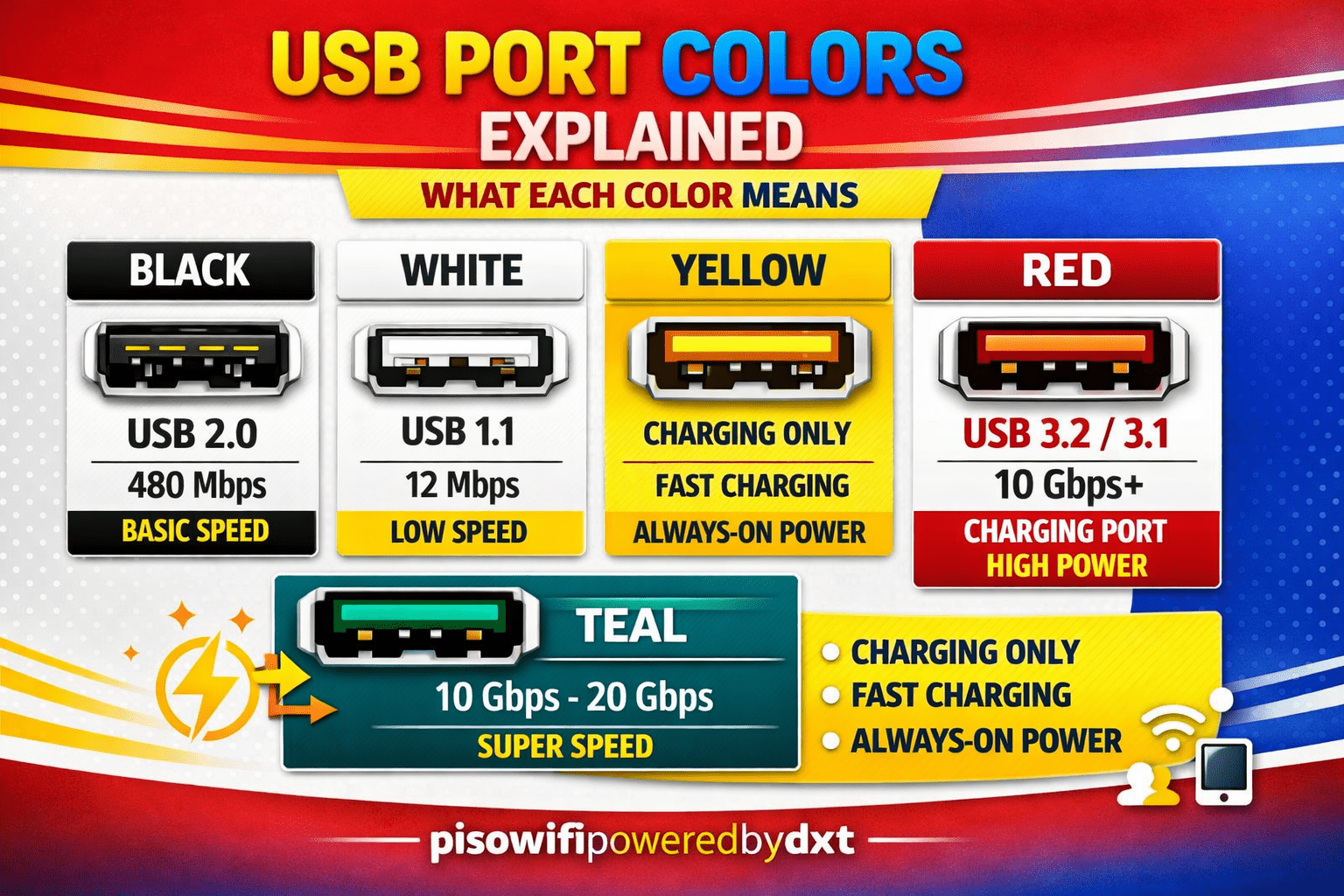
A Quick USB Color Guide
Here’s a simple summary of common USB colors:
- White: Older USB, often slower
- Black: Standard USB 2.0
- Red: High power or always-on charging, sometimes USB 3.x
- Yellow: Charging-focused port, often always-on
- Teal: Newer, faster USB standard on some devices
Important Note: Color Is Not a Rule
One of the biggest mistakes people make is assuming every USB color means the same thing everywhere. That is not true.
Why colors can vary
Manufacturers may use colors for different reasons, such as:
- Branding
- Design preferences
- Power features
- Data speed
- Device-specific functions
That’s why the best way to identify a USB port is to combine the color with:
- The port symbol
- The device manual
- The USB version label
- The manufacturer’s product page
How to Tell What a Port Really Does
If you want to know what a port supports, look for more than color alone.
Check for these clues
- USB symbol: Some ports have special icons
- SS marking: Often means SuperSpeed USB
- Charging icon: May indicate power delivery
- Thunderbolt symbol: On some devices, this marks a different high-performance connection
- Manual or specs page: The most reliable source
A port’s color can point you in the right direction, but the specs confirm it.
Final Thoughts
Understanding usb port colors explained is useful when you want to choose the right port for charging, syncing, or transferring files. White and black ports usually represent older or standard connections, while red and yellow often point to charging features. Teal usually suggests a faster, more modern port.
Because USB colors are not fully standardized, always confirm with the device documentation when possible. That way, you can plug in with confidence and get the best performance from each port.