THE ULTIMATE GUIDE TO COMPUTER PORTS: Know What Goes Where
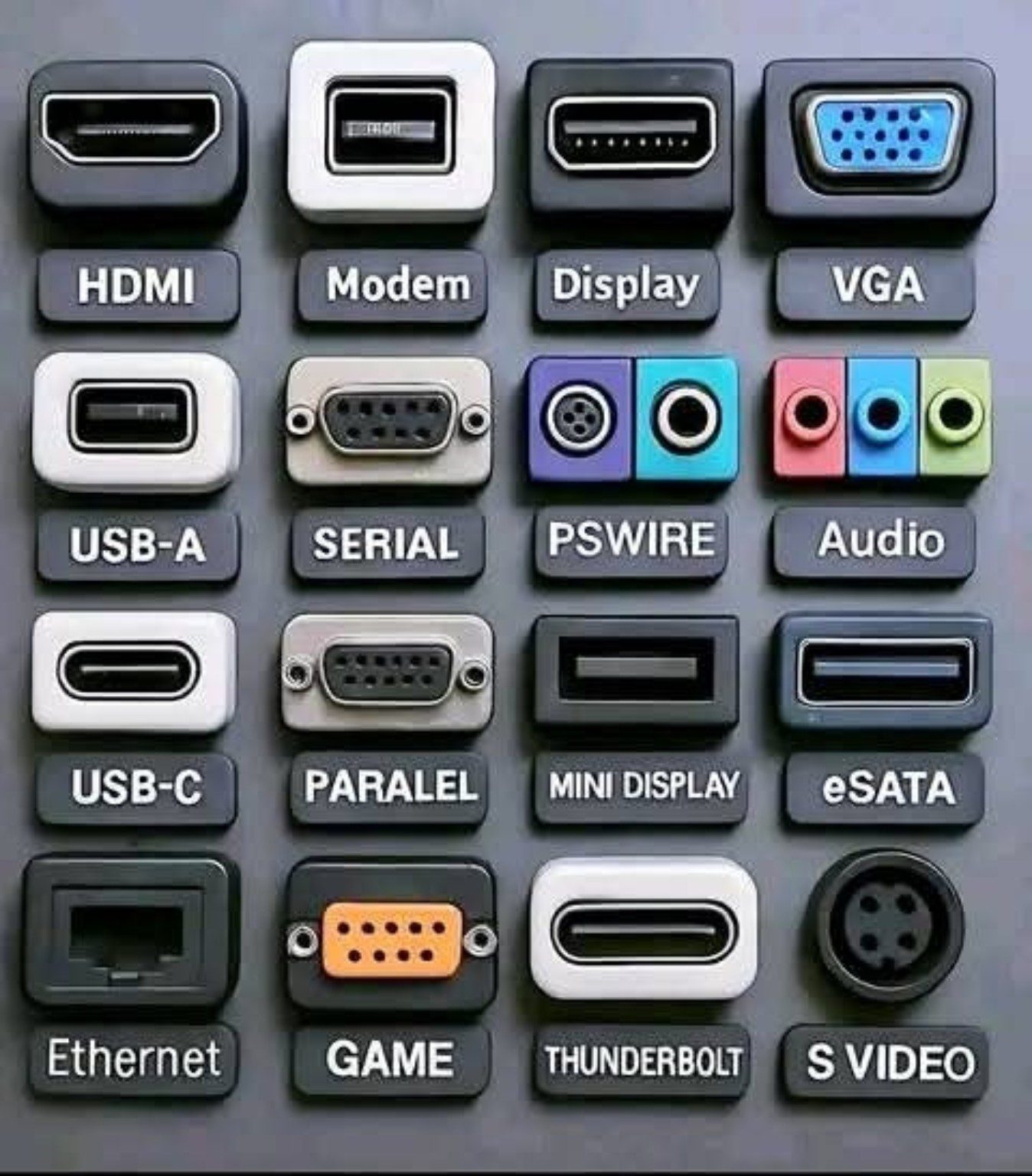
Whether you’re setting up a Piso WiFi vendo, building a PC, or just curious about all those weird shapes at the back of your device, it’s important to understand the many types of computer ports. This image is a helpful visual showing 16 of the most common types of ports — and in this post, we’ll break them down for you.
- HDMI (High Definition Multimedia Interface)
Used for: High-definition video and audio
Common in: TVs, monitors, and projectors
Modern standard for media display
- Modem (RJ11)
Used for: Dial-up internet and landline phone connections
Outdated but still seen in legacy systems
- DisplayPort
Used for: High-quality video and audio (similar to HDMI)
Preferred by gamers and video professionals for better refresh rates
- VGA (Video Graphics Array)
Used for: Older monitors and projectors
Analog signal only — replaced by HDMI and DisplayPort in most systems
- USB-A (Universal Serial Bus – Type A)
Used for: Mouse, keyboard, USB drives, etc.
Most common port for peripherals
- Serial Port
Used for: Very old devices like industrial equipment
Obsolete for everyday users, but still in use in niche industries
- PS/2 (PSWIRE)
Used for: Old-style keyboards (purple) and mice (green)
Still found on some motherboards for BIOS access reliability
- Audio Jacks
Used for: Headphones (green), microphone (pink), and line-in/out (blue)
Color-coded for ease of use
- USB-C
Used for: Fast charging, file transfers, and even video output
Reversible and future standard across most devices
- Parallel Port
Used for: Old printers and scanners
Another legacy port replaced by USB in modern setups
- Mini DisplayPort
Used for: Apple computers and high-resolution displays
Compact version of DisplayPort
- eSATA (External SATA)
Used for: External hard drives
High-speed data transfer for storage
- Ethernet (RJ45)
Used for: Wired internet connections
Still the fastest and most stable internet connection for Piso WiFi systems
- Game Port
Used for: Old gaming controllers and joysticks
Largely obsolete today
- Thunderbolt
Used for: High-speed data, video, and power
Popular in Apple devices, combined with USB-C in newer versions
- S-Video
Used for: Standard-definition video
A relic from the analog video era
Final Thoughts:
Understanding these ports helps you set up hardware efficiently, troubleshoot problems faster, and avoid damaging your equipment by plugging in the wrong connector. For Piso WiFi builders like us, knowing the right port for the right purpose is a small detail that makes a big difference in the field.
Keep this guide handy — or better yet, share it with your customers or technicians.
“Sa tamang port, walang short!”